


Account Management

One click to add, modify and delete user accounts across systems.
On multiple operating systems in your installation (UNIX/Linux, Windows, OpenVMS)

The same remote management software as the Standard Edition but with central administration.
SysMan Utilities is an advanced and user-friendly remote administration tool that offers extensive management capabilities on servers and PCs in your network.
The Professional Edition comes with every feature of the Standard Edition, but also includes centralized management over multiple administrative consoles and users.
Try It Today!
See how the SysMan Utilities Professional Edition can benefit you, with a free fully-functional 30-day trial:
You may also want to view the SysMan documentation.
The SysMan Utilities console puts remote management of all your Windows machines at your finger tips. Day-to-day maintenance and troubleshooting becomes much easier as it can be initiated from a single console, rather than through the typical cumbersome process of opening multiple windows and using multiple Windows tools.
Permissions and preferences of all SysMan users are all kept at the central SysMan Authorization server. From each connected SysMan client, a SysMan user will find and be able to manage the same personal preferences, list of manual connections, favorites, labels and stored credentials.
Multiple SysMan user accounts are managed centrally. Each can be assigned different access permissions. The product, thereby, is able to be used to delegate distinct management responsibilities.
Use SysMan Remote Control to remotely drive PC and server desktops across your enterprise network. Remote desktops and terminal server sessions are completely under your supervision. Without having to leave your desk, SysMan Remote Control allows you to perform remote assistance and administrative tasks, as well on attended as on unattended machines.
SysMan User ManagementMultiple SysMan user accounts are managed centrally. Each can be assigned different access permissions. The product, thereby, is able to be used to delegate distinct management responsibilities. |
 |
Delegation through profiles and tokensEach SysMan User can be assigned different access permissions. The product, thereby, is able to be used to delegate distinct management responsibilities. |
 |
Central Audit BrowserAll management actions are recorded by SysMan in an Audit Log. As such, each transaction in the Audit Log provides details of by whom, from where and when the action was performed, whether it succeeded and any possible changes that were made by it. All transactions are available for subsequent browsing and reporting. |
 |
SysMan ExplorerAs a central starting point for all remote machine management and maintenance, the multifunctional SysMan Explorer window gives the administrator an intuitive and easy way of browsing and searching the Active Directory and enterprise network. Define manual connections, maintain various sets of machines in labels and favorites, and apply filters on components which are to be shown or hidden in the SysMan Explorer itself. |
 |
Large (and growing) collection of toolsSysMan holds a large collection of built in tools and utilities which can be used to perform remote management on a selection of computers. |
 |
Vertical FilteringWith SysMan Utilities, you can apply a filter to isolate only the rows that match a specific set of the criteria (vertical filtering). Most embedded displays come with a predefined set of filters and column layouts, which can all be customized to your unique needs. In addition, you can easily create, export and share your own customized filters with other users. |
 |
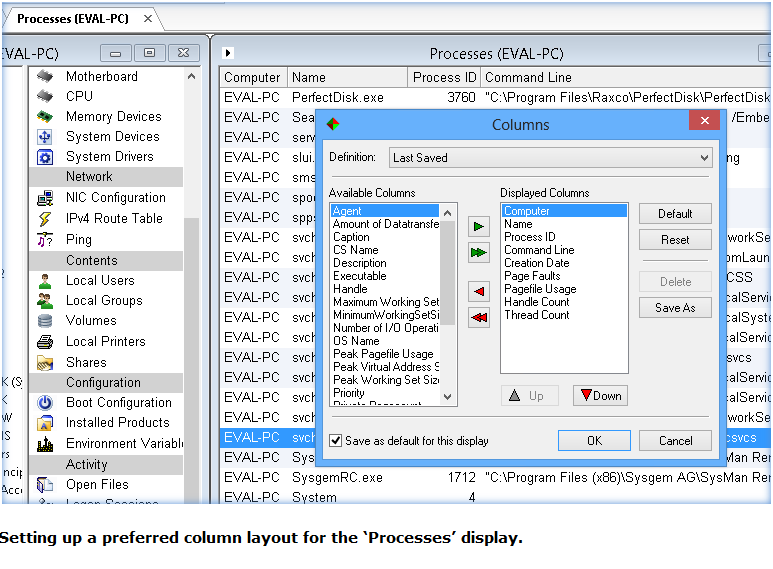
Horizontal FilteringWith SysMan Utilities, the column layout can easily be refined to reveal the significance of the retrieved data (horizontal filtering). Most embedded displays come with a predefined set of column layouts, which can all be customized to your unique needs. |
 |
Advanced Exporting CapabilitySysMan’s unique exporting capability allows all outputs (including Audit Log data) to be exported to a friendly form in various formats, including HTML, Excel, Word, text and email. |
 |
Target multiple computers at onceSelect multiple computers and perform simultaneous maintenance on the multiple selection. Rather than requiring repeated actions across multiple nodes, simultaneous actions on a multiple selection is a guaranteed saviour of your valuable time. |
 |
Locate Computer Entries in the Enterprise NetworkSysMan can easily locate and highlight computer entries based on name or computer comment. |
 |
Easily find Objects in Active DirectoryFrom the Active Directory root or any container and subcontainers, locate User, Group, OU or Computer objects based on any listed Active Directory field. Optionally save your search as a custom filter for later usage. |
 |
Group computer entries by labelsEvery computer entry can be assigned one or more labels to allow grouping and easy categorizing. Maintaining categories of computers contributes to fast and multiple computer selections on general maintenance tasks. |
 |
Favorite Computer entriesSysMan holds a special ‘Favorite Connections’ group which allows quick navigation to the computers which are targeted most often. |
 |
Save work sets in SessionsSysMan’s exclusive Saved Sessions feature allows combinations of tools that have been opened and connected to specific machines to be saved in their running state and subsequently restarted at a single click of the mouse. Active filters and customized column-layouts that have been applied to the tool windows are saved and restored with each of the saved sessions. |
 |
Audit BrowserAll management actions are recorded by SysMan in an Audit Log. As such, each transaction in the Audit Log provides details of when the action was performed, whether it succeeded and any possible changes that were made by it. All transactions are available for subsequent browsing and reporting. |
 |
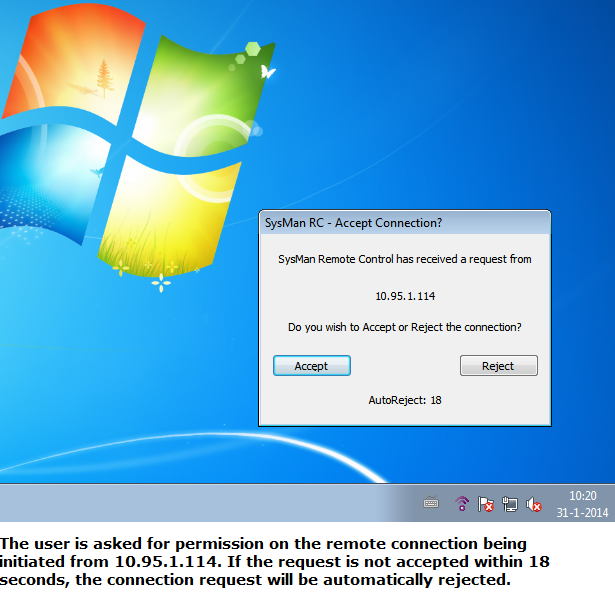
Initiate connections attended or unattendedThe Remote Control server can optionally be set up to post a connection request to the user sitting behind the desktop, before a connection is initiated. The connection request set up can be given a timeout and default response (acceptance or rejection). |
 |
Either show or hide active connectionsBy default, the SysMan RC server notifies on incoming connections. These notifications however can be disabled, should circumstances ever demand it. |
|
Shared SessionsA SysMan Remote Control Server (the machine where you connect ‘to’) supports simultaneous sessions from multiple Remote Control clients (the machine you connect ‘from’), thereby handing you more possibilities such as giving presentations, attending conference meetings and a helpdesk user calling a colleague for participation in a remote assistance session. Chat MessagesThe user of SysMan and the logged in user of the remote target machine can send each other text messages in a chat window. |
 |
File TransferTransfer files between the local and remote machine in either direction through an intuitive file browser window. |
 |
Connect to Linux, OSX and othersThe RC Client can alternatively be instructed to connect over plain VNC and therefore supports connections to other Operating Systems like Linux, MAC OSX, and Unix (assuming a VNC server is installed). |
 |
Terminal Services and Remote Desktop sessions supportUse SysMan Remote Control to participate in an active terminal server (MSTSC/RDP) session, without interrupting the session of the currently remote logged on user. |
 |
SysMan RC Server ManagerMaintain and configure Remote Control Server installations across your network. Optionally perform management over multiple Remote Control Servers, on multiple machines at once. |
 |
Remote Control Server Configuration TemplatesMaintain and apply various Remote Control Server configurations in customizable templates. A default set of templates is included in the standard kit. |
|
Remotely shutdown or rebootSysMan can easily initiate a clean shutdown or reboot on the a single or selection of remote machines in the enterprise network |
 |
Remote Command toolSysMan offers the ability to run and review the output of DOS/BATCH-commands (like 'ipconfig', 'netstat -a', 'dir c:\*.*') on the target remote system or consecutively on multiple systems. As with all other SysMan tools, executed commands and their output are automatically archived in the Audit Log. |
 |
External program/utilities supportDefine and maintain parameter supported shortcuts to external programs to be initiated from SysMan Explorer, targeted to the selected computer. All settings will be stored in the SysMan library. SysMan comes with a predefined default set of shortcuts (Computer Management, TeamViewer and DameWare MRC), which can be initiated straight away (provided that the actual software is installed), or can be used as examples to build your own. |
 |
| All documentation in one ZIP file |

|
| SysMan Remote Control User Guide |

|
| SysMan Utilities User Guide |
|
| SysMan Professional Quick Start Guide |
|
| SysMan Professional Installation and Config Guide |
|
All documentation are in pdf format. you can download Adobe Reader here:

One click to add, modify and delete user accounts across systems.
On multiple operating systems in your installation (UNIX/Linux, Windows, OpenVMS)
One click to manage and monitor all of your important servers.
On multiple operating systems in your installation (UNIX/Linux, Windows, OpenVMS)
Disseminate distributed file content from a central location.
On multiple operating systems in your installation (UNIX/Linux, Windows, OpenVMS)
Sysgem SysMan and Access Gateway work together.
They provide secure and controlled remote access to Windows workstations over the Internet.
Find answers to common support questions in our Knowledge Base.
If you require support with an issue not listed here, or have any other enquiries, please contact us.
© Sysgem AG, all rights reserved.
Sysgem is a trademark of Sysgem AG. Other brands and products are registered trademarks of their respective holders.
Sysgem AG, Forsterstrasse 67, CH-8044 Zurich, Switzerland
+41 44 586 1060