Logfile Concentrator
Log File Concentrator
Collects log file data from remote multi-platform servers and stores the data in a central database. A browser provided with the product accesses the database; filters data and raises alarms when specific events occur.
Remote log files include Windows Event Logs, UNIX/Linux Syslogs, OpenVMS Audit Journals, SNMP Traps.
Try It Today!
See how Sysgem's Log File Concentrator product can benefit you, with a free fully-functional 30-day trial:
DOWNLOAD WHERE TO BUY
The Sysgem Logfile Concentrator is a Windows-based multi-domain, multi-platform, multi-protocol solution.
Features
- Concentrates Logfile records from multiple remote (multi-platform) servers into a central database.
- Archives records for long-term storage (Sarbanes-Oxley compliance).
- Displays records as they are generated in a user-customisable display.
- Creates web reports using a scheduled job - the reports typically required by managers and auditors. Sample web reports from the Sysgem test servers are available here.
- Generates user-defined alarms (SMS, E-mail, notifications) when specific criteria are met.
- Full web-browser interface for remote access.
- Runs as a lights-out solution.
- Supports common ODBC databases such as Microsoft SQL Server, ORACLE and Microsoft Access.
Logfile record formats currently supported
- Windows Event Log
- Syslog (UNIX, network devices)
- SNMP Traps (all platforms, network devices)
- OpenVMS Audit Trail (HP Integrity Server {Itanium}, AXP and VAX)
- Other formats (such as OS400 XE "OS400" Message Queue) will be available in a later release, please contact your distributor or Sysgem for release dates.
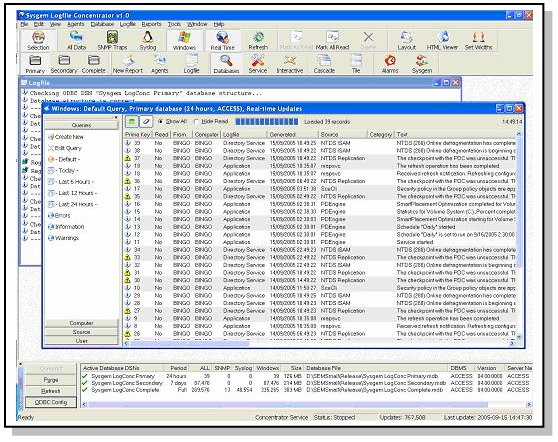
Logfile Concentrator console monitoring Windows event logs
Alarm definitions include
- Matching criteria using any combination of field values.
- Assigning alarms to individual users.
- Thresholds – criteria must be met [x] times in [y] seconds before the alarm actions are triggered.
- Minimum repeat intervals – don't trigger the actions more than once every [y] seconds.
- Cut and paste - copying a Logfile Concentrator entry to the clipboard, then pasting it into a new alarm definition.
Alarm actions include
- Sending E-mail,
- Sending SMS,
- Playing sound files,
- Network messages (NET SEND...),
- Text-to-Speech,
- Windows Management Instrumentation (WMI) scripting.
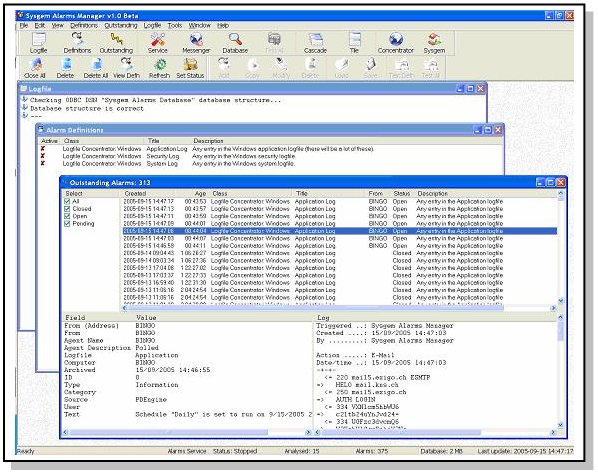
Alarms Manager Console
Download or Purchase Sysgem Log File Concentrator
DOWNLOAD WHERE TO BUY
Installation
Installation:
- Takes just a few minutes - install the Windows kit and start the user console.
- Uses Microsoft Access by default – see the power of the Logfile Concentrator without installing another database product,
- Archiving runs in the background as a set-and-forget Windows service.
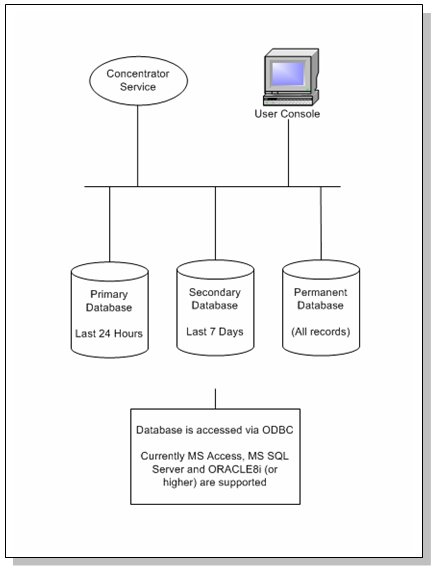
A typical configuration is shown below.
The main installation is on a Windows 2000 (and higher) system where a database such as Microsoft SQL Server or ORACLE is available. Although you can use Microsoft Access be aware that there is a maximum database size with Access of 1GB or approximately 200,000 logfile entries. It is recommended that you install on a Windows Server.