
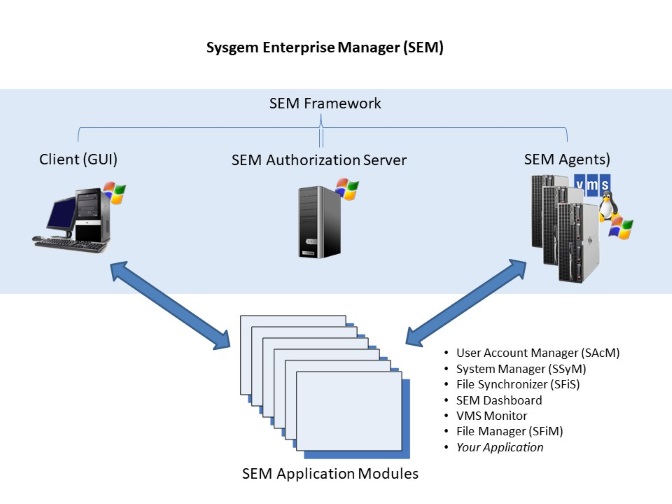
The SEM Framework consists of:
This software framework performs common tasks required by the layered application modules. For example, scripts which need to be executed on target systems are assembled by the application modules and handed to the framework. The framework transfers the scripts to SEM software agents running on the target servers, executes them on the servers and transfers the resultant data back to the application modules for display in the GUI.
The SEM framework also provides a programmable interface to the layered applications for other functions such as filtering, alarming, reporting, accessing databases, caching data, etc.
The SEM Client provides the user interface. It is manually invoked by the user to interact with the other system components to manage target servers. It first connects with the Authorization Server to validate the user’s login credentials. Depending on the user’s level of authority a set of menu options and a list of servers are then made available.
The SEM Authorization Server is the focal point of the product. It is responsible for:
The SEM Agent is installed with sufficient privileges on target servers to conduct the required system management tasks. It is, basically, a script processing engine. Scripts are transmitted to the agent for execution. Results of running the scripts are returned to the GUI and the scripts are discarded as soon as they have been run.
The Agent software is very simple since it has no intelligence regarding the application scripts (it simply runs authenticated scripts and returns the results). It therefore has few software upgrades compared to the applications stored at the central Authorization Server. This is a bonus for customers since there are usually many installations of the Agent on a network, but only one installation of the Authorization Server.
The following diagram outlines the interactions between the main components of SEM. Users log into the SEM Client and have their credentials verified by the Authorization Server. Menu options are displayed on the users’ workstations and command scripts are transmitted to the Agents on the target servers. When SSL/TLS is being used as the communication protocol, the messages that are transmitted to the Agents are first signed by the Authorization Server and verified by the Agents. After the scripts have run on the target servers, the results are transmitted back to the SEM Client for display.

Using a secure access mechanism, the ‘SEM Web Access Request’ system provides for the automated submission of scripts to run on target systems without the involvement of an interactive user. This is an easy way of developing routines to process requests submitted through a customer’s Intranet website.
Our multi-platform system management solution provides:
For further details please contact us at This email address is being protected from spambots. You need JavaScript enabled to view it.
Find answers to common support questions in our Knowledge Base.
If you require support with an issue not listed here, or have any other enquiries, please contact us.
© Sysgem AG, all rights reserved.
Sysgem is a trademark of Sysgem AG. Other brands and products are registered trademarks of their respective holders.
Sysgem AG, Forsterstrasse 67, CH-8044 Zurich, Switzerland
+41 44 586 1060