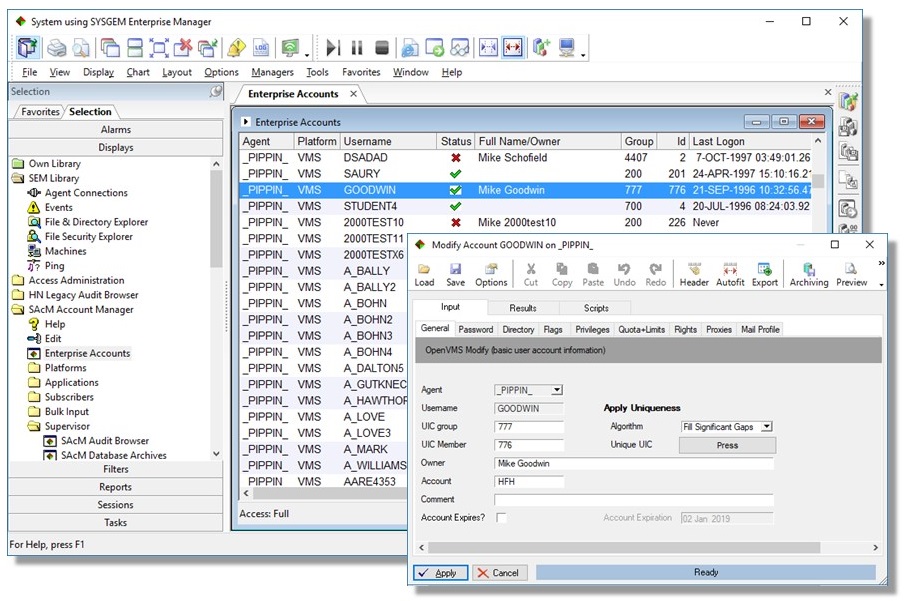
List all user accounts

  • Identify all machines in a multi-platform network (or sub-network) and extract a list of all accounts together with all their fields
  • Existing accounts - across all platforms, network-wide - are sorted, filtered and multiply-selected, and updated in a single operation
  • Sort user accounts by any field in the set of accounts
  • Apply filters to identify all users that satisfy specific characteristics (such as having raised privileges, containing a particular text string in their username, or not having logged in for a particular period of time)
  • Statistical and detailed user account reports are produced with ease

Account Manager screenshot 

Create user account

  • Create everything required for a new user with a single transaction (multi-platform, multi-application, multi-server, multiple accounts)
  • 'Templates' provide default field input, based on type of user / organizational group / geographical location / etc.

Modify user account

  • Select a single user account & modify any/all fields

Delete user account

  • Delete multiply-selected user accounts, with the option to delete owned resources
  • Customize so that data is archived as a pre-delete action

Update user accounts

  • Update any field in a multiply-selected list of accounts
  • Set passwords / enable / disable / clear lockout flag / etc. in multiply-selected accounts
  • Choose between machine-generated or administrator-typed passwords
  • Full input validation provided on administrative workstation
  • Add/remove accounts to/from group membership
  • Add/remove identifiers from multiply-selected accounts
  • Add/remove VMS disk quotas

Manage Intrusion Databases

  • Show current status
  • Keep permanent audit trail
  • Reset intrusion lockouts

Rename accounts

  • Rename an account and modify dependent resources

Subscriber Database

  • Personnel records are based on X.500 / LDAP style records
  • You associate user accounts to a person via the subscriber database
  • Use default data from subscribers during account creation (to save keying time and increase consistency of data)
  • Select multiple accounts owned by the same person and carry out administrative actions in one action
  • Access the subscribers via ODBC to a standard database (SQL Server, Access, etc)
  • Use reconciliation reports to authenticate ownership of accounts by subscriber records
  • Use reconciliation reports to identify unofficial account creation/deletion (i.e. when SAcM has not been used)

Web Access Request Database (WAR)

  • Submit user account management requests for automated action via the WAR DB
  • Bulk input of account changes submitted from spreadsheets

Reports

  • Obtain a snapshot of accounts at any point in time
  • Analyze accounts according to account type or field details
  • Store reports for future comparison
  • Identify differences between two sets of reports (e.g. highlight accounts that have acquired increased privileges, etc)

Customizability

  • Modify or add new customer specific fields to transaction forms
  • Modify existing scripts or create new ones for automatic execution as part of the standard transactions
  • Add new Menu options / forms
  • A single central repository of customizations, which is automatically propagated after updates
  • Define your own 'templates' and 'roles'
  • Set up Help Desk / Administrator / Supervisor modes

Security

  • Reduces security risks when staff leave by determining the ownership of user accounts
  • Identify, disable/delete accounts of someone who has just left the organization
  • More details on this feature see the description of the Subscriber Database

Easy Delegation & Access Control

  • SAcM allows you to delegate responsibility with confidence and safety
  • Profiles are provided for generic SEM access control
  • Tokens allow access permission to be granted according to more detailed criteria
  • Grant/deny access to specific platform types, machines, user groups, individual users and field types
  • Grant/deny access to development/ customize interface
  • Grant/deny access to audit trail browser

Full Accountability

  • All actions are recorded in Central Audit Trail log database
  • Audit Browser, which can only be accessed by auditors


Download & Free Trial


download icon 80percent     thumb sem jigsaw 9percent 

Check the SEM architecture


Account Management

thumb iden mg

One click to add, modify and delete user accounts across systems.

On multiple operating systems in your installation (UNIX/Linux, Windows, OpenVMS)

Discover More

Download and Free Trial

System Management

thumb sem

One click to manage and monitor all of your important servers.

On multiple operating systems in your installation (UNIX/Linux, Windows, OpenVMS)
Discover More

Download and Free Trial

File Synchronization

thumb dstri file synch

Disseminate distributed file content from a central location.

On multiple operating systems in your installation (UNIX/Linux, Windows, OpenVMS)

Discover More

Download and Free Trial

Access Gateway

thumb sysman acc gtw

Sysgem SysMan and Access Gateway work together.

They provide secure and controlled remote access to Windows workstations over the Internet.

Discover More

Try our Express Demo

Downloads

Download a full featured evaluation kit from a list of available products.

Run the product under a trial license for 30 days before deciding to proceed. 

Knowledge Base

Find answers to common support questions in our Knowledge Base.

If you require support with an issue not listed here, or have any other enquiries, please contact us.


© Sysgem AG, all rights reserved.

Sysgem is a trademark of Sysgem AG. Other brands and products are registered trademarks of their respective holders.

Sysgem AG, Forsterstrasse 67, CH-8044 Zurich, Switzerland
+41 44 586 1060